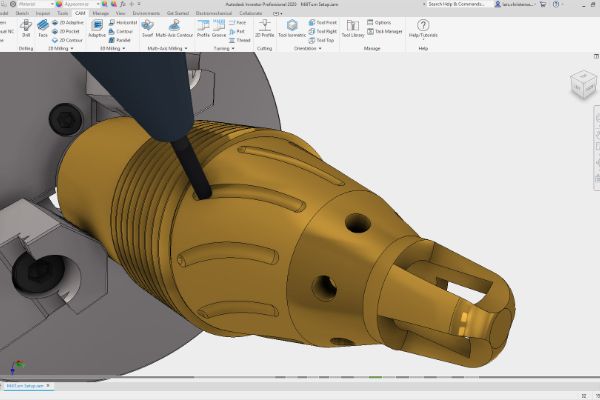
Get started with Autodesk Inventor HSM and explore how CAM connects component design with CNC manufacturing in a continuous workflow.
Develop toolpath skills from 2D and 2.5D milling through 3D and simultaneous multi-axis machining, using a consistent approach to milling and mill-turn programming.
At the end of the course, you will be able to:
- Understand the fundamental concepts, workflows and benefits of using Inventor HSM.
- Locate and navigate the Inventor HSM user interface and browser environments.
- Understand the 2D / 2.5D, 3D, Multi-axis Milling and Turning commands.
- Understand the machining simulation and post process generation.
On completion, participants should be able to programme parts efficiently using a range of Inventor HSM machining strategies.
BENEFITS OF Inventor Advanced – HSM CAM TRAINING

Enhanced CAD/CAM Skills

Improved Productivity

Quality and Accuracy

Stay Competitive
View Course Content
DAY 1
CHAPTER 1: 2D MACHINING
- To Perform Facing
- To Contour the Part (Tutorial 1)
- To Machine the Pocket
- To Machine the Counter bores (Tutorial 1)
- To Drill Holes
- To Tap Holes (Tutorial 1)
- To Post Process the Toolpaths (Tutorial 1)
CHAPTER 2: 2D MACHINING ADVANCE
- To Create the Setup (Tutorial 2)
- To Contour the Part (Tutorial 2)
- To Machine the Internal Pocket
- To Drill the Threaded Holes
- To Tap Holes (Tutorial 2)
- To Drill the Counter bored Hole
- To Machine the Counter bore
- To Machine the Countersinks
- To Machine the Chamfer
- To Post Process the Toolpaths (Tutorial 2)
DAY 2
CHAPTER 3: CAM MANIA
- To Create the Setup (CAM Mania)
- To Face the Stock
- To Rough Out the Three Pockets
- To Finish Cut the Three Pockets
- To Rough Cut the Outside of the Part
- To Finish the Outside of the Part
- To Machine the Chamfers
- To Machine the Countersinks (CAM Mania)
- To Drill the Four Holes
- To Tap the Four Holes
- To Simulate and Post Process the Toolpaths
CHAPTER 4: 3 + 2D MACHINING
- To Pocket Using Adaptive Clearing
- To Clear Using 3D Pocket
DAY 3
CHAPTER 5: HIGH SPEED 3D MACHINING
- To Create the Setup (Tutorial 4)
- To Create a Tool Library
- To Rough Using Adaptive Clearing (Tutorial 4)
- To Rest Rough Using 3D Pocket
- To Machine Steep Areas Using Contour
- To Machine Shallow Areas Using Scallop
- To Use Scallop for a Finishing Operation
- To Machine the Base Surface Using Horizontal
- To Machine Fillets Using Pencil Milling
- To Finish the Part
- To Post Process the Part – Tutorial 4
CHAPTER 6: ADVANCED 3D MACHINING
- To Create the Setup (Tutorial 5)
- To Face the Part
- To Perform Outside Contouring (2D)
- To Rough Using Adaptive Clearing (Tutorial 5)
- To Rest Machine Using Adaptive Clearing
- To Finish the Horizontal Surfaces
- To Finish Steep Areas with Contour
- To Machine Using Parallel Finishing
- To Machine Fillets Using Pencil – Part 1
- To Machine Fillets Using Pencil – Part 2
- To Machine Fillets Using Pencil – Part 3
- To Post Process the Part – Tutorial 5
CHAPTER 7: INTRODUCTION TO TURNING
- To Create a Turning Setup
- To Face Cylindrical Stock
- To Machine a Turning Profile
- To Machine a Groove
- To Cut an External Thread
- To Cut Off the Part
LET’S TALK TRAINING
A good place to start.
Tell us what you would like to learn or how you would like to collaborate. Our team will help with the next step.
YOUR NEXT CHAPTER
Let’s talk trainingReady for your next step?
Let’s find the right training for you or your team.
