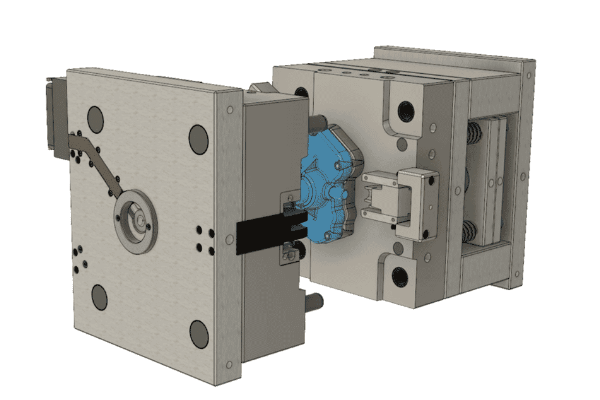
Build on Inventor solid- and part-modelling experience to work more efficiently with complex assemblies.
Start with top-down design using Derive, multi-body models and layouts. Continue with simplification, positional and level-of-detail representations, iMates, iAssemblies, Frame Generator, Design Accelerator and file-management methods. Inventor Studio exercises introduce realistic rendering and animation.
At the end of the course, you will be able to:
- Applying motion to existing assembly constraints using either Motion or Transitional Constraints.
- Introduction of the Top-Down Design technique for creating assemblies and its components.
- Tools for Top-Down Design, such as associative links, adaptive parts, multi-body and layout design, derived components, and skeleton models.
- Creating Positional Representations to review motion, evaluate the position of assembly components, or document an assembly in a drawing.
- Using Shrink-wrap and other model simplification tools to create a part model that represents an overall assembly.
- Creating Level of Detail Representations to reduce the clutter of large assemblies, reduce retrieval times, and substituting models.
- Using the Design Accelerator to easily insert standard and customizable components and features into your model.
- Creating rendered realistic images and animations of parts and assemblies using Autodesk Inventor Studio and the Video Producer.
- Using iMates and iAssemblies to work efficiently with assemblies.
- Using the Frame Generator to create members in a structural frame.
- Using pattern, mirror, and copy techniques to duplicate components in an assembly.
- Working with weldments.
- Link and drive parameters to and from a spreadsheet. You also learn to custom format and create expressions in a parameter.
BENEFITS OF Inventor Advanced – Assembly Modeling TRAINING
DAY 1

Enhanced Assembly Design Skills
Efficient Workflow

Collaboration and Interoperability
Analysis and Visualization
View Course Content
DAY 1
CHAPTER 1: WORKING EFFECTIVELY WITH ASSEMBLIES
- General Assembly Tips
- Relationship Tips
- Motion Constraints
- Transitional Constraints
CHAPTER 2: INTRODUCTION TO TOP-DOWN DESIGN
- Top-Down Design Process
- Top-Down Design Tools
CHAPTER 3: DERIVED COMPONENTS
- Derived Components
- Modify Derived Components
CHAPTER 4: MULTI-BODY PART MODELING
- Multi-Body Part Modelling
CHAPTER 5: LAYOUT DESIGN
- Layout Design
CHAPTER 6: ASSOCIATIVE LINKS AND ADAPTIVE PARTS
- Associative Links
- Adaptive Assembly Parts
CHAPTER 7: IMATES
- iMates
CHAPTER 8: POSITIONAL REPRESENTATIONS
- Introduction to Positional Representations
- Create and Edit Positional Representations
- Use Positional Representations
DAY 2
CHAPTER 9: MODEL SIMPLIFICATION
- Shrinkwrap
- Assembly Simplification
CHAPTER 10: LEVEL OF DETAIL REPRESENTATIONS
- Level of Detail Representations
- System-Defined Level of Detail Representations
- User-Defined Level of Detail Representations
- Using Level of Detail Representations
- Substitute Level of Detail Representations
- LOD Productivity Tools
CHAPTER 11: DESIGN ACCELERATOR
- Design Accelerator
- Generators
- Calculators
- Engineering Handbook
CHAPTER 12: ADVANCED FILE MANAGEMENT
- Design Assistant
- Pack and Go
- Purging Old Files
DAY 3
CHAPTER 13: INVENTOR STUDIO
- Rendering
- Animation
- Video Producer
- Creating a Standard Room
CHAPTER 14: IASSEMBLIES
- Introduction
- Create Basic iAssemblies
- Create Multi-Level iAssemblies
- Create iAssemblies Using Existing Assemblies
- Place iAssemblies
- Edit iAssemblies
CHAPTER 15: FRAME GENERATOR
- Frame Generator
- Structural Shape Author
CHAPTER 16: ASSEMBLY DUPLICATION OPTIONS
- Pattern Components
- Mirror Components
- Copy Components
CHAPTER 17: WORKING WITH WELDMENTS
- Working with Weldments
- Fillet Welds
- Cosmetic Welds
- Groove Welds
LET’S TALK TRAINING
A good place to start.
Tell us what you would like to learn or how you would like to collaborate. Our team will help with the next step.
YOUR NEXT CHAPTER
Let’s talk trainingReady for your next step?
Let’s find the right training for you or your team.
